
Pest & lawn software comparison
Briostack vs. Jobber: Which Platform Fits Your Pest or Lawn Business?
Published – October 19th, 2026
Briostack and Jobber both give pest control and lawn treatment businesses robust tools to manage scheduling, routing, billing, customer communication, and day-to-day operations. Jobber takes a broad approach to managing home service businesses across many industries, with capabilities spanning the customer journey and field service.
The core difference is the operating model each platform is designed around.
Jobber is built to support a wide range of home service businesses. Briostack is built around growing businesses where recurring pest control or lawn treatment is the primary operating model. As your business adds customers, treatment rounds, routes, technicians, services, and locations, managing it all efficiently gets harder. Briostack helps you bring in more recurring revenue from the customers you already have, get more capacity from every route, and maintain control as you grow.
If you need a flexible platform to manage a broad home service business, Jobber can be a strong fit. If recurring treatment drives your business and growth is making it harder to manage efficiently, Briostack is built for that next stage.
This comparison is written and published by Briostack. We’ve aimed to represent both platforms fairly, including where Jobber may be the better fit. Product details can change, so we recommend confirming current features and pricing directly with each provider.
Why operators choose Briostack
Key Briostack highlights
Get more value from recurring customers
Manage agreements, renewals, price increases, and additional services more easily to grow and protect recurring revenue.
Maximize every route
Use route optimization, automatic recurring scheduling, and bulk route changes to improve route density and get more capacity from your existing team.
Keep treatment programs on track
Manage multi-round sequencing, seasonal programs, and weather-driven rescheduling alongside day-to-day operations.
Scale the operation, not the burden
Automate repetitive work, standardize recurring workflows, and gain greater visibility as customers, routes, technicians, services, and locations grow—without enterprise complexity.
Side by side
Briostack vs. Jobber at a Glance
|
Category |
Briostack |
Jobber |
|---|---|---|
|
Best-Fit Customer |
Growing pest control and lawn treatment businesses built primarily around recurring, route-based service, treatment programs, service lines, or locations |
Home-service businesses across many trades that want a flexible, all-in-one platform for managing customers, jobs, field work, payments, and other day-to-day needs |
|
Industry Fit |
Purpose-built around recurring pest control and/or lawn treatment as the primary business model |
Built to support a wide range of home service industries, including pest control and lawn care |
|
Ease of Use & Adoption |
Structured onboarding built around recurring pest and lawn workflows |
Self-serve setup and free trial, with additional onboarding and support available on higher tiers |
|
Recurring Service & Treatment Programs |
Recurring agreements, treatment programs, service sequencing, and treatment history designed to manage the full recurring program |
Recurring jobs and visits with flexible scheduling, reassignment, forms, checklists, and service documentation |
|
Route Optimization & Disruption Recovery |
Intelligent route optimization, recurring scheduling, bulk route changes, and flex-day workflows connected to recurring pest and lawn treatment operations. |
Route optimization plus bulk rescheduling, reassignment, date shifting, and customer notifications for schedule disruptions |
|
Recurring Revenue (Renewals, Price Increases, Bundles) |
Renewal workflows, bulk price changes, service bundles, and customer outreach designed around recurring customer relationships |
Quote options and follow-ups, Pipeline, campaigns, referrals, reviews, and Client Hub support customer growth and retention |
|
Customer Experience & Communication |
Automated customer notifications and communication connected to recurring service and treatment workflows |
Client Hub, reminders, texts, emails, follow-ups, online booking, reviews, and referrals |
|
AI |
AI Note Refiner and Pest Identifier (Preview), with AI Brio Assistant in development, focused on field documentation and business insights |
Broad AI tools for customer intake, communication, quoting, workflow administration, reporting, and business recommendations |
|
Multi-Location Visibility & Reporting |
Multi-location management and AI-supported interactive business dashboards and custom reports for visibility into recurring service and business performance |
Dashboards, custom reports, goals, recommendations, and higher-tier multi-location capabilities |
|
Pricing Model |
Customized pricing based on business needs, with concurrent licensing based on active users rather than total seats |
Published tiered plans, with additional users and some capabilities available as paid add-ons |
|
Implementation & Time to Value |
Guided onboarding focused on setting up recurring pest and lawn treatment workflows |
Self-serve setup and free trial, with additional onboarding and support available on higher tiers |
|
Scalability |
Built for growing recurring pest and lawn businesses that need more control without moving to enterprise software |
Supports growing home-service businesses through higher tiers, broader capabilities, integrations, and add-ons |
See how Briostack fits your operation
A personalized demo built around your routes, team, and recurring customers.
The tipping point
The Core Difference: What Your Recurring Business Needs as It Grows
Jobber’s broad approach can be an advantage for businesses with a wide range of field service needs. The tipping point isn’t simply when your business gets bigger. It’s when recurring treatment becomes harder to manage efficiently.
More recurring customers mean more treatment rounds, routes, technicians, and services to coordinate, along with more renewals, pricing changes, and revenue opportunities to manage.
Briostack is built for that stage of growth. Its recurring treatment workflows and automation help reduce the manual decisions and extra work those moving pieces can create, so your business can grow without becoming proportionally harder to manage.
Recurring revenue
Get More Value from Recurring Customers
Winning a recurring customer is only the beginning of the relationship. Renewals, additional services, price changes, and consistent billing can all help grow and protect recurring revenue. The challenge is managing those opportunities consistently across a growing customer base.
Briostack brings those revenue workflows into the same platform you use to manage recurring service. Renewals, price changes, additional services, billing, and customer outreach can be managed alongside the customer relationship, helping you retain customers, expand the services they buy, and keep recurring revenue moving.
How Jobber compares
Jobber also offers strong customer growth and engagement capabilities, with a broader approach spanning lead generation, marketing, customer communication, and ongoing relationships. That breadth can be valuable for businesses that want one platform to manage more of the customer journey.
Pest & lawn programs
Built Around Recurring Pest and Lawn Programs
Recurring pest control and lawn treatment involve more than scheduling repeat visits. Keeping a program on track means coordinating service agreements, treatment timing, routes, customer history, billing, and renewals across every service cycle or season.
Briostack is built to manage those pieces as a connected recurring program, including:
How Jobber compares
Jobber also supports recurring pest and lawn work, including recurring visits, scheduling changes, routing, forms, and service documentation. Both platforms can manage repeat service, but Briostack is designed specifically around the workflows that keep a recurring treatment program moving from one round to the next.
That means keeping treatment timing and sequence, routes, service history, billing, and renewals connected throughout the customer relationship, helping your team keep programs on track with less manual coordination as the business grows.
Built for growth
Built for the Demands of a Growing Recurring Operation
Keep Treatment Programs Moving
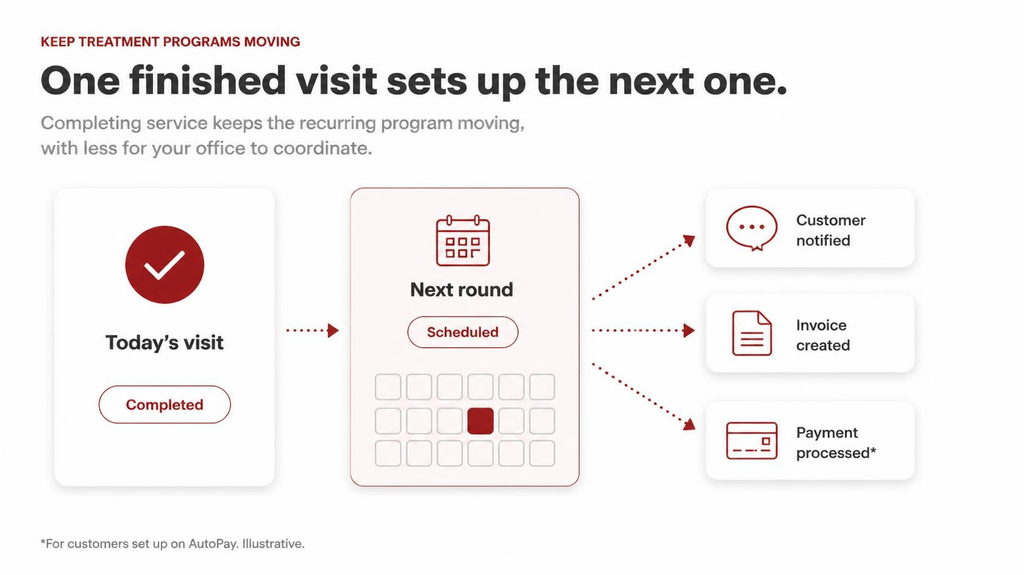
Every completed treatment can set the next round of work in motion. Across a growing customer base, tasks like scheduling the next visit, keeping customers informed, billing, and collecting payment create a lot of work for your team to coordinate.
Briostack helps keep that work moving. When a technician completes a service, the platform can automatically generate the next appointment in the treatment sequence, send the appropriate customer notification, generate the invoice, and, when the customer is set up for AutoPay, process payment. That reduces the individual steps your team has to manage as recurring service volume increases.
How Jobber compares
Jobber also supports recurring scheduling, customer communication, billing, and other workflows that help keep repeat service moving. Briostack’s more specialized focus is on managing the recurring pest or lawn treatment program itself, including the timing and sequence of services from one treatment round to the next. This helps teams keep ongoing programs on track as they manage more customers and treatment schedules.
Maximize Every Route
Every mile between appointments uses technician time that could otherwise go toward completing service. Scattered routes, weather disruption, and frequent schedule changes can reduce your team’s capacity and make it harder to keep treatment programs on track.
Briostack connects intelligent route optimization and automatic recurring scheduling with bulk route changes and flex-day scheduling to help teams adjust when technicians call out or weather disrupts the schedule. The goal is to reduce unnecessary drive time, keep treatment rounds on track, and create more capacity for your existing team to complete service and bring in revenue.
How Jobber compares
Jobber also offers strong route optimization and tools for recovering from schedule disruptions, including bulk rescheduling and reassignment. For recurring pest and lawn businesses, the bigger question is what happens to the treatment program when routes change.
Briostack connects routing with recurring scheduling and treatment timing so teams can adjust the day while keeping the larger program in view.
See What Needs Attention as You Grow
More recurring customers mean more treatment rounds, routes, billing, payments, and day-to-day work for your team to coordinate. With more happening across the business, it’s harder for managers to see where workloads are getting too heavy, performance is slipping, or attention is needed.
Briostack’s reporting gives managers visibility across recurring service, routes, workload, revenue, and locations. That makes it easier to understand how your business is performing as you grow and identify where compounding workloads or other issues may need attention.
How Jobber compares
Jobber also has strong reporting capabilities. The difference to evaluate isn’t simply whether either platform provides reports or dashboards. It’s whether the information available helps you answer the questions that matter most as your business grows.
Where AI Fits into the Business
Jobber’s approach
Jobber currently offers broad AI capabilities across customer intake, communication, quoting, workflow automation, reporting, and business recommendations. These tools can help teams respond faster and reduce repetitive day-to-day work.
Briostack’s AI roadmap takes a more specialized approach, focusing on helping pest and lawn teams work more efficiently and manage their growing businesses. Capabilities currently in Preview are designed to help technicians document service more clearly and identify pests during field visits, helping them work more efficiently at each stop.
An AI assistant is also in development to help owners and managers understand business performance, find relevant information, and identify where attention is needed as the business grows.
While Jobber currently offers AI across more areas of the business, Briostack is focusing its AI development on the needs of recurring pest and lawn service businesses. When comparing the platforms, consider how these capabilities could help your team complete service, reduce repetitive work, and make better decisions—and which are available to help you today.
Grow Without Unnecessary Complexity
Growing recurring pest and lawn businesses can need more from their software without needing the cost and complexity of an enterprise platform. Briostack is designed for that middle ground, with standardized recurring workflows, multi-location visibility, concurrent licensing, and a public API to support changing business and technology needs.
How Jobber compares
Jobber can also support growing businesses through broader capabilities, higher-tier plans, integrations, and add-ons. The difference is the kind of growth each platform is designed to support.
Briostack focuses on helping recurring pest and lawn businesses add customers, routes, services, and locations without having to rebuild the processes that keep recurring work moving.
Ready to get more from every route?
See how Briostack connects scheduling, routing, billing, and growth in one platform.
Common ground
Where the Two Platforms Overlap
Briostack and Jobber share plenty of features. Both platforms support:
That’s why a feature checklist alone doesn’t tell you which platform will fit your business better. Jobber provides these capabilities in a platform built to support many types of home-service businesses, while Briostack takes a more specialized approach focused on recurring pest control and lawn treatment.
When you compare the platforms, consider how the features work together, whether the workflows match how your business operates, and whether they help solve the problems that become more important as you grow.
Cost
Pricing and What’s Included
Jobber
Jobber uses published tiered pricing, with plans that add capabilities as business needs grow. Additional users and some features are priced separately, so total cost depends on the plan, team size, and capabilities you need.
Briostack
Briostack uses customized pricing with concurrent licensing, meaning you license for the number of people using the platform at the same time rather than every employee who may need access. This can provide more flexibility as you add technicians during busy seasons or adjust staffing as you grow, depending on how your office and field teams use the system.
Because the models work differently, compare the Jobber plan, users, and add-ons you’d actually need with customized Briostack pricing—not simply the lowest advertised starting price.
Request customized Briostack pricing to compare the total cost for your business.
Getting started
Onboarding and Support
Jobber offers self-serve setup and a free trial, which can be an advantage for businesses that want to get started quickly. Additional onboarding and support are available on higher-tier plans.
Briostack takes a more guided approach. Your team gets help setting up the recurring pest or lawn processes that matter to your business, from service agreements and treatment programs to billing and reporting. Ongoing support is also available as your needs change.
Fit
Which Platform Is the Better Fit for Your Operation?
Company size or feature count alone doesn’t determine the best software for your pest control or lawn treatment business. It depends on how your business operates today and what problems your software needs to help you solve next.
Jobber may be the better fit if:
Briostack may be the better fit if:
Decide with confidence
How to Choose Between Briostack and Jobber
As you compare your options, ask:
Is recurring service getting harder to manage?
Consider whether adding customers, treatment rounds, routes, technicians, or locations is creating more work and coordination for your team.
Are you getting enough value from your existing customers?
Think about how consistently you manage renewals, price changes, additional services, and other opportunities to grow and protect recurring revenue.
Could you get more from your existing routes and team?
Look at route density, windshield time, weather-driven schedule changes, and whether technicians have the capacity to complete more service efficiently.
Is growth creating more work throughout the business?
Consider how much time goes into scheduling treatment rounds, adjusting routes, communicating changes, managing billing and renewals, and figuring out what needs attention.
Where would AI create the most value?
Consider whether your priorities are customer response, quoting, communication, field documentation, reporting, or understanding what’s happening across recurring service.
How well does the software fit the way your business works?
Consider whether you need broad support across a home-service business or deeper workflows for running recurring pest or lawn treatment programs.
60-second self-check
Is recurring treatment getting harder to manage?
If recurring treatment is becoming harder to manage as your business grows, Briostack may be the better fit. If your needs are better served by broad home service capabilities and your recurring workflows don’t require the same level of specialization, Jobber may be the better fit.
The right choice should solve the problems you’re facing today while giving you room to handle what becomes harder as the business grows—without adding complexity you don’t need.
Next step
See Briostack in Action
See how Briostack could fit the way your pest control or lawn treatment business works today and what you’ll need as you grow. A personalized demo can focus on the recurring workflows that matter most to your team, including treatment programs, scheduling and routes, customer growth, billing, and reporting.
If recurring treatment is becoming harder to manage as your business grows, see how Briostack can help you keep the work connected and moving without adding unnecessary complexity.
FAQ